Networks & Firewall Rules
Networks define and address range and gateway ip
- Address ranges: 1.240.0.0/16
- This has a 16 bit prefix, 65,535 possible unique ip adresses [2^16]
- Gateway is 10.240.0.1
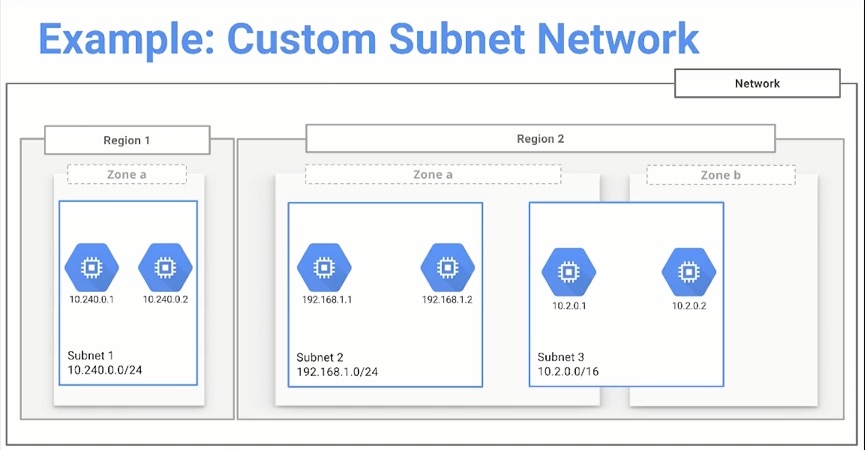
- Networks are subdivided into regional subnetworks
- These define what subnetwork ip addresses will be
When looking at the default route rules it makes a set of rules for each region, what the ip ranges will be. It also creates a rule for internet access
Routes
- Controls how packets sent from instances
- Routes are global resources, not tied to a particular zone or region
- Requires:
- Destination IP Range
- Specified instance tag
- Apply to only one network
Firewall Rules
Rules ONLY apply to inbound traffic
Initially, a default network has firewall rules that allow:
- ICMP, RDP, and SSH
- You can SSH into any instance
- RDP to access windows VM's
- Ping each instance from outside of the platform
- Second Firewall Rule
- TCP and UDP traffic on any port
- ICMP for private address space inside the network
- ICMP, RDP, and SSH
Limiting traffic LEAVING instances
- Need to configure something like IP tables
- Installed on Debian images?
- Need to configure something like IP tables
Allowing access for instances to access local private instances
- NEED TO ALLOW TCP ACCESS ON NECESSARY PORT
Default Firewall Rules
- default-allow-icmp
- This is for being able to externally ping an instance
- default-allow-internal
- Can communicate with other instances via internal ip addresses
- default-allow-rdp
- Windows machines
- default-allow-ssh
- Allow SSH access into linux machines
Instance IP Addresses
- Internal Address, mandatory
- Ephemeral (dynamic) if not defined
- User assigned during creation
- External Address
- Internet accessable
- EPHEMERAL by default
- Can be changed to a static address
- Communication between instances inside of a network is done via internal addresses
- If Instances are NOT in the same network they must communicate via external addresses
Network Management
Tags
- use tags to manage how firewall rules apply to instances
- Can be used to filter traffic source or destination
Connection to instances without external ip addresses
Bastion Host - jump host
- Single point of entry to a network containing instances with internal IP addresses
Other methods
- Configure a VPN - Connects on-premises network to Compute Engine network via IPsec connection
- Configure a NAT gateway - Machine that routes traffic to the internet on behalf of instances